For Windows 11

Organic light, carefully kept.

Luciola controls your monitors right from the desktop over DDC/CI: brightness, contrast, picture mode and input, without fighting the on-screen menu. On top come helpers that can lower the risk of burn-in on OLED panels.
Coming soon to Microsoft Store Help and support

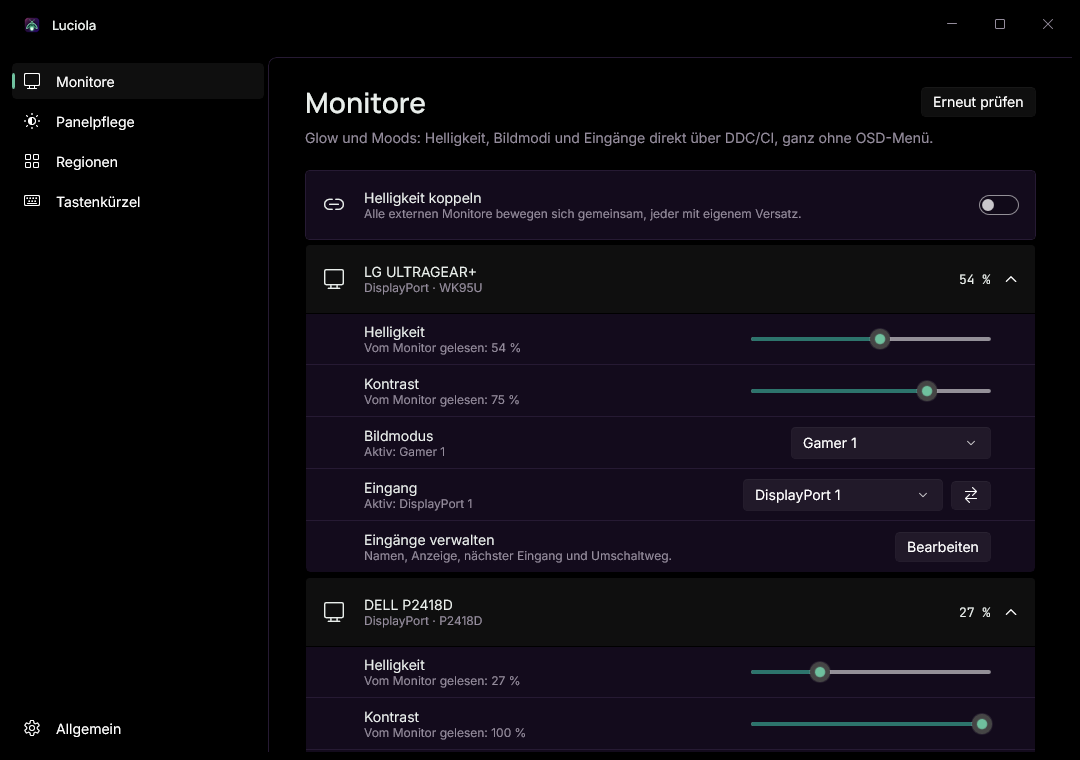
Luciola, Monitors page: cards for an LG ULTRAGEAR+ and a Dell P2418D with sliders for brightness and contrast, pickers for picture mode and input, and the Link brightness switch.
The Monitors page in Luciola

Every monitor, one card.

  • Values read straight from the monitor, not guessed.
  • Picture mode and input with the names your monitor uses.
  • Link brightness: all monitors together, each with its own offset.
  • True black underneath, so Luciola itself stays OLED-friendly.

What Luciola does

Lantern

Hold a light to the panel and look closely.

Lantern shows test patterns for uniformity, gray and near black, image retention, subpixels, inversion and blooming. For motion it measures the real frame rate and shows it in the UFO test, pursuit, moving text and crosstalk. Afterwards brightness, Shade and everything else are back as before.

Schematic: same speed, fewer frames per second.

Monitors

Luciola specializes in LG OLED monitors and works with any monitor that speaks DDC/CI. When Luciola does not know a model yet, it asks once whether you would like to send us a monitor report. You see all of it first, and it contains no serial number.

Stays with you

No accounts, no ads, no telemetry. Luciola never sends anything on its own, and this site sets no tracking cookies and loads nothing from other servers.

Read the privacy policy

No software can rule out burn-in completely. Your monitor's own care routines keep running as usual.